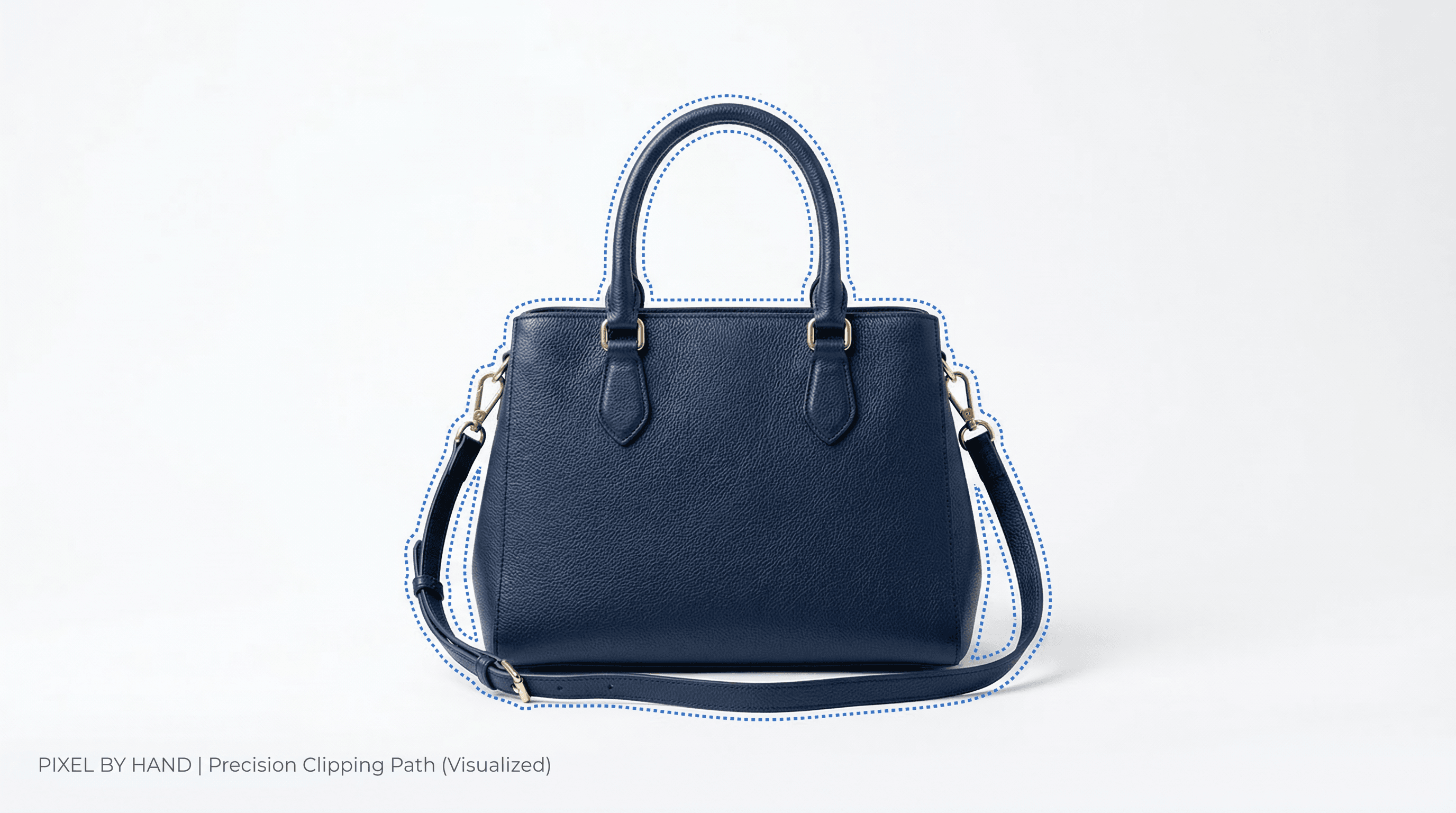
Every product you sell online lives or dies by its image. A crisp, distraction-free photo on a clean white background can be the difference between a scroll-past and a sale. That is exactly what a clipping path service delivers — and in this guide, we cover everything you need to know.
At Pixel by Hand, we have spent over a decade editing product images for 500+ eCommerce brands worldwide. This guide draws on that experience to explain what clipping paths are, the different types available, how they compare to image masking, how to create one yourself in Photoshop, and — crucially — how to choose the right service provider when you are ready to outsource.
Table of Contents
- What Is a Clipping Path?
- How Clipping Paths Are Used in eCommerce
- Types of Clipping Path Service
- Clipping Path vs. Image Masking
- How to Create a Clipping Path in Photoshop
- Why Outsource Your Clipping Path Work?
- How to Choose the Best Clipping Path Service Provider
- Who Needs a Clipping Path Service?
- Frequently Asked Questions
What Is a Clipping Path?
A clipping path is a closed vector shape — drawn around a subject in an image — that separates it from its background. Think of it as a precise digital outline. Everything inside the path is kept; everything outside is removed or replaced.
The technique is sometimes called deep etching because it isolates the subject right down to its finest edges. It is created using the Pen Tool in software such as Adobe Photoshop or Illustrator, and is the industry-standard method for background removal in product photography.
Once the path is applied, you can:
- Remove the background entirely for a pure white or transparent backdrop
- Replace the background with a lifestyle scene, solid colour, or branded graphic
- Isolate specific elements from a group shot to create individual product listings
- Change colours of a product without affecting the rest of the image
- Add shadow effects to give products depth and a natural, grounded appearance
- Create product mockups by placing the clipped item into a new setting
In short, a clipping path makes your product images infinitely more flexible — and far more professional.
How Clipping Paths Are Used in eCommerce
Online retailers rely on clipping paths daily. Here are the most common applications:
Marketplace Compliance
Platforms like Amazon, eBay, Shopify, and Etsy have strict image guidelines. Amazon, for instance, requires a pure white background (RGB 255, 255, 255) for main product images. A clipping path lets you meet these requirements quickly, regardless of how your original photo was shot.
Removing Distracting Backgrounds
A busy or cluttered background pulls attention away from your product. Clipping the product onto a clean backdrop ensures the customer's eye goes exactly where you want it — onto the item they are considering buying.
Standardising Your Product Catalogue
If your product images were photographed at different times, in different locations, or by different photographers, they will look inconsistent. Clipping paths allow you to place every product on a uniform background, creating a cohesive and trustworthy catalogue.
Splitting Group Shots into Individual Listings
Suppose you photograph a living room set — sofa, chairs, coffee table — in a single image. A clipping path lets you extract each item into its own standalone photo for individual product pages, whilst also keeping the group shot for cross-sell purposes.
Showcasing Colour Variants
Rather than re-shooting a product in every available colour, you can clip the original image, isolate the relevant sections, and apply colour changes digitally. Customers see all colour options without the cost of additional photography.
Highlighting Intricate Details
For products like jewellery, watches, or electronics, clipping paths preserve fine details — gemstone facets, dial markings, connector ports — while eliminating background noise. The result is a sharp, detailed product image that builds buyer confidence.
Creating Versatile Marketing Assets
A clipped product image with a transparent background can be dropped into banner adverts, email newsletters, social media posts, catalogues, and brochures. One photoshoot feeds every marketing channel.
Types of Clipping Path Service
Not all clipping paths are equal. The complexity of the object determines the type of path required — and the cost.
| Type | Complexity | Typical Use Cases | Anchor Points | Typical Cost per Image |
|---|---|---|---|---|
| Basic | Low | Simple shapes — boxes, bottles, books, balls | 1–100 | £0.25 – £0.80 |
| Simple | Low–Medium | Shoes, bags, electronics with gentle curves | 100–250 | £0.50 – £1.50 |
| Medium | Medium | Clothing on hangers, grouped products, furniture | 250–500 | £1.00 – £3.00 |
| Complex | High | Jewellery, bicycles, chairs with spindles, netted fabric | 500–1,000 | £2.00 – £5.00 |
| Super Complex | Very High | Fur, hair, trees, intricate lace, multiple holes and gaps | 1,000+ | £4.00 – £10.00+ |
Basic Clipping Path
Used for objects with smooth, well-defined edges and minimal curves — think a book, a smartphone, or a cardboard box. A single closed path with relatively few anchor points is all that is needed. This is the fastest and most affordable option.
Multiple (Compound) Clipping Path
When a product has several distinct sections that need independent editing — for example, changing individual colours on a garment — a compound clipping path is used. Each section gets its own path, allowing colour correction, shadow adjustment, or background changes to be applied independently.
This type is essential for ghost mannequin (invisible mannequin) work, where neck joints and inner garment areas need separate treatment.
Complex Clipping Path
Reserved for items with intricate outlines — bicycle spokes, wicker furniture, chain-link jewellery, or clothing with cut-outs and perforations. The editor must trace around dozens (sometimes hundreds) of tiny gaps and details. It is labour-intensive but produces pixel-perfect results.
Colour-Path Service
A specialist technique that combines clipping paths with colour channel selection. It is particularly useful when you need to isolate an element defined more by its colour than its shape — for instance, extracting a red dress from a red-toned background.
Clipping Path vs. Image Masking
These two techniques are often confused, but they serve different purposes.
| Feature | Clipping Path | Image Masking |
|---|---|---|
| How it works | Creates a hard-edged vector path around the subject | Uses pixel-based selections with variable opacity |
| Edge type | Clean, defined edges | Soft, feathered, or semi-transparent edges |
| Best for | Products with solid, well-defined outlines | Subjects with hair, fur, smoke, translucent fabric, or wispy edges |
| Software tool | Pen Tool (vector) | Layer masks, channel masks, alpha masks (raster) |
| File output | Works in EPS, PSD, TIFF with embedded paths | Typically PSD or TIFF with mask channels |
| Speed | Faster for simple objects | Slower, requires more finesse |
| Typical cost | Lower | Higher (due to complexity) |
When to Use a Clipping Path
- The product has clear, hard edges (electronics, boxes, bottles, furniture)
- You need a precise cut-out for a white or solid-colour background
- The image will be used in print layouts requiring an EPS clipping path
When to Use Image Masking
- The subject has soft or semi-transparent edges (hair, fur, feathers, lace)
- You need to preserve translucency (glass, mesh, sheer fabric)
- The background is complex and tonal separation is needed
Can You Combine Both?
Absolutely. Many professional edits use a clipping path for the main body of a product and masking for specific areas — for example, clipping the outline of a model's jacket whilst masking the flyaway hair. A good clipping path service provider will know when to apply each technique for the best result.
How to Create a Clipping Path in Photoshop
If you want to try it yourself, here is a step-by-step walkthrough using Adobe Photoshop.
Step 1: Open Your Image
Launch Photoshop and go to File > Open to load your product image.
Step 2: Select the Pen Tool
From the toolbar on the left, select the Pen Tool (shortcut: P). Make sure it is set to Path mode in the options bar at the top, not Shape.
Step 3: Create a New Path
Open the Paths panel (Window > Paths). Click the Create New Path icon at the bottom of the panel. This keeps your work path separate and saveable.
Step 4: Trace Around the Subject
Click to create anchor points around the edge of your product. For curved edges, click and drag to create Bezier handles that shape the curve. Work your way around the entire subject.
Tips for better results:
- Zoom in to at least 200% for precision
- Place anchor points at every change of direction
- Keep the path just slightly inside the product edge (about 1 pixel) to avoid capturing background fringe
- Use as few anchor points as possible whilst still following the contour accurately
Step 5: Close the Path
When you reach your starting point, click on the first anchor point to close the path. You should see the familiar "marching ants" outline when converted to a selection.
Step 6: Save the Path
Double-click on the path name in the Paths panel and give it a descriptive name (e.g., "Product Outline"). This saves it permanently with the file.
Step 7: Apply the Clipping Path
To use the path for background removal:
- With the path selected, click the Load Path as Selection button at the bottom of the Paths panel
- Go to Select > Inverse to select the background instead
- Press Delete to remove the background
- Alternatively, add a Layer Mask to the image layer for non-destructive editing
Step 8: Export
Save the file as a PSD (to preserve layers and paths) or export as PNG for a transparent background. If you need an EPS with an embedded clipping path, go to File > Export > Paths to Illustrator.
Reality check: Creating clipping paths manually is time-consuming, especially at volume. A single complex product image can take 15–30 minutes to path accurately. If you are editing dozens or hundreds of images, outsourcing to a professional clipping path service is almost always more cost-effective.
Send us your images for a free sample edit — see the difference professional editing makes.
Why Outsource Your Clipping Path Work?
Even if you know how to create a clipping path, doing it yourself at scale rarely makes business sense. Here is why outsourcing works:
Time Savings
Background removal is repetitive and meticulous. An experienced editor completes in minutes what takes a non-specialist much longer. Outsourcing frees your team to focus on revenue-generating activities — merchandising, marketing, customer service.
Cost Efficiency
Hiring a full-time in-house editor means paying a salary whether you have 10 images that week or 1,000. An outsourced clipping path service lets you scale spend to match demand — especially valuable during seasonal peaks like Black Friday, Christmas, and January sales.
Consistent Quality
A professional service applies the same standards across every image. Your product catalogue looks uniform and polished, which builds customer trust and brand credibility.
Access to Specialist Skills
Complex clipping paths, ghost mannequin composites, and colour-path extractions require years of practice. A dedicated service has editors who do this work day in, day out — their precision is hard to match in-house unless image editing is your core business.
Faster Turnaround
Professional services like Pixel by Hand typically deliver edited images within 24 hours. No bottlenecks, no missed listing deadlines.
How to Choose the Best Clipping Path Service Provider
Not all providers are equal. Here are the factors to evaluate:
1. Quality of Work
Ask for sample edits before committing. Look at the edges — are they clean and precise, or rough and jagged? Check that fine details (stitching, logos, small elements) are preserved. Read reviews from past clients.
2. Turnaround Time
Speed matters in eCommerce. Your provider should offer 24-hour turnaround as standard, with options for rush delivery when needed.
3. Pricing Transparency
Avoid providers who quote vaguely. The best services offer a flat rate per image or a clear pricing tier based on complexity. You should know exactly what you will pay before work begins.
4. Security and File Handling
You are handing over product images — potentially before they are publicly listed. Ensure your provider uses secure file transfer, has confidentiality policies, and will not share your images.
5. Scalability
Can the provider handle 10 images today and 500 next week? Seasonal businesses need a service that scales without quality drops or missed deadlines.
6. Customer Support
Responsive, clear communication is essential. You should be able to reach your editing team quickly when you have questions, revision requests, or urgent jobs.
7. Range of Services
The best providers offer more than just clipping paths. Look for complementary services — colour correction, retouching, ghost mannequin, shadow creation — so you can handle all your editing needs in one place.
8. Free Trial
A reputable service will let you test their work before you pay. If a provider will not offer a free sample edit, that is a red flag.
Start your free trial with Pixel by Hand — send us your images and we will show you what we can do.
Who Needs a Clipping Path Service?
Online Retailers and eCommerce Stores
Whether you sell on Amazon, eBay, Shopify, Etsy, or your own website, clean product images are non-negotiable. A clipping path service ensures every listing meets platform requirements and looks professional.
Fashion Retailers
Clothing, footwear, and accessories benefit enormously from clipping paths and ghost mannequin composites. The result is a consistent, catalogue-quality look across your entire range.
Jewellers
Intricate details — gemstone facets, filigree patterns, chain links — demand precision editing. A combination of clipping paths and masking ensures every piece looks as stunning online as it does in person.
Product Photographers
Professional photographers use clipping path services to deliver finished, background-removed images to their clients. It is faster than doing it in-house and lets them focus on shooting rather than post-production.
Car Dealers and Automotive Businesses
Vehicle images with cluttered showroom backgrounds look unprofessional. Clipping paths let you present every car on a clean, consistent backdrop — essential for online listings and advertising.
Graphic and Web Designers
Designers use clipped images in website headers, banner adverts, social media graphics, and print materials. A transparent-background product image is one of the most versatile assets in any design toolkit.
Marketing Teams
From email campaigns to catalogue layouts to social media adverts, marketing teams reuse product images constantly. Clipped images with transparent backgrounds slot into any design without additional editing.
Frequently Asked Questions
What is the difference between a clipping path and background removal?
A clipping path is the technique used to achieve background removal. It involves drawing a precise vector outline around the subject. Background removal is the outcome — the background is gone, and the product remains. There are other methods of background removal (such as masking or AI-based tools), but clipping paths remain the gold standard for clean, hard-edged products.
How much does a clipping path service cost?
Pricing depends on image complexity. Basic clipping paths (simple shapes) typically cost £0.25–£0.80 per image. Complex images with intricate details can range from £2.00–£10.00+. Most professional services offer volume discounts. At Pixel by Hand, we provide a flat rate per image with no hidden fees.
Can AI replace manual clipping paths?
AI background removal tools have improved significantly, but they still struggle with fine details — wispy edges, semi-transparent materials, complex overlapping elements. For high-quality eCommerce imagery where precision matters, manual clipping paths created by experienced editors remain superior. Many professional services use AI as a first pass, then refine manually for the best of both worlds.
How long does it take to create a clipping path?
A basic clipping path takes an experienced editor 2–5 minutes. Complex images with many anchor points can take 15–30 minutes or more. Professional services typically offer 24-hour turnaround for standard volumes.
What file format should I send my images in?
For the best results, send high-resolution images in TIFF, PSD, or high-quality JPEG format. Avoid heavily compressed files, as compression artefacts can make precise clipping more difficult. Your edited images can be returned in any format you need — PSD, PNG (transparent background), JPEG, or TIFF with embedded paths.
Do I need clipping paths if I shoot on a white background?
Often, yes. Even images shot on a white backdrop rarely have a perfectly pure white background (RGB 255, 255, 255) straight from the camera. Shadows, lighting gradients, and slight colour casts mean the background still needs cleaning up. A clipping path ensures a truly clean result that meets marketplace standards.
Ready to Transform Your Product Images?
At Pixel by Hand, we have been delivering professional clipping path services to eCommerce brands since 2006. Our experienced editors handle everything from basic background removal to complex multi-path composites — with 24-hour turnaround and consistent quality across every image.
Start your free trial today — send us a selection of your product images and we will show you exactly how we can improve them. No obligation, no credit card required.